ASTRAVISTAOmni-Channel Media Intelligence
A complete view of public conversation
ASTRAVISTA monitors, analyses and reports public conversation on X, Facebook, Instagram, TikTok and YouTube, as well as local, national and international online media, in one platform installed on your agency's own infrastructure.
- On-premise
- Application and storage in your agency's data centre
- White label
- Presented under your agency's identity
- 24/7 support
- Remote technical support and analyst assistance
Monitoring / Summary Dashboard
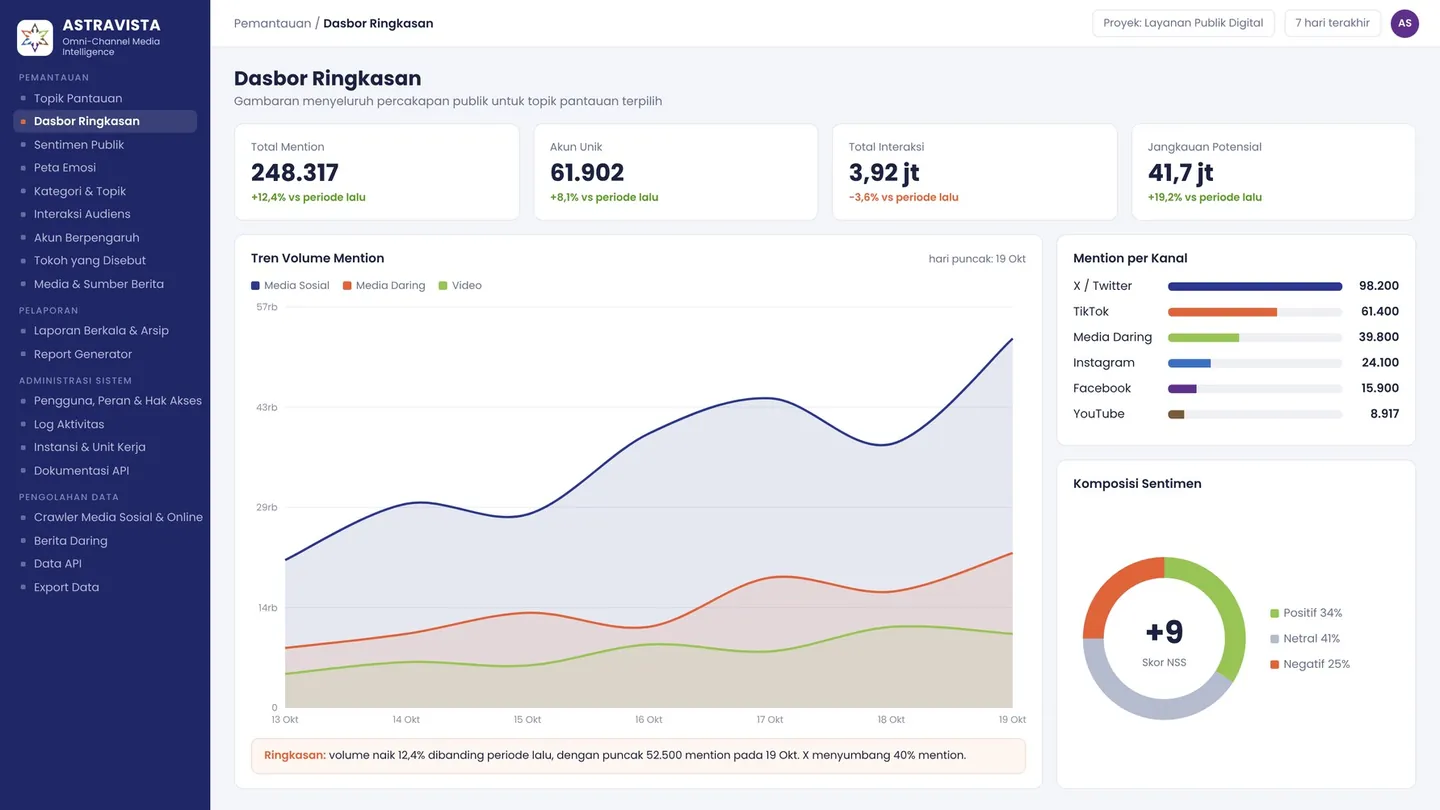
Topic: Digital Public ServicesLast 7 daysIllustrative dataSummary Dashboard
A complete picture of public conversation for the selected monitored topic
- Total Mentions
- 248,317
- +12.4% vs previous period
- Unique Accounts
- 61,902
- +8.1% vs previous period
- Total Engagement
- 3.92M
- -3.6% vs previous period
- Potential Reach
- 41.7M
- +19.2% vs previous period
Mention Volume Trend
- Social media
- Online media
Summary: Volume rose 12.4% on the previous period, peaking at 52,500 mentions on 19 Oct. X accounts for 40% of mentions.
Mentions by Channel
- X98.2K
- TikTok61.4K
- Online media39.8K
- Instagram24.1K
- Facebook15.9K
- YouTube8.92K
Sentiment Mix
- Positive 34%
- Neutral 41%
- Negative 25%
01Six channels
Six directions, one monitored topic
The name ASTRAVISTA combines Astra, a star like the six-pointed emblem, and Vista, a wide view. The platform works the same way: five social networks and one online media channel come together in a single monitored topic.
- X
- TikTok
- YouTube
Five social networks
X, Facebook, Instagram, TikTok and YouTube are collected through keyword search, accounts, posts and comments.
One online media channel
Local, national and international news portals are collected source by source, so coverage is captured without depending on keywords.
Every incoming mention is enriched by AI on arrival: sentiment, emotion, category, topic, people and organisations, and location.
02Three pillars
From monitoring to reporting, in one workflow
ASTRAVISTA is built on three connected pillars: what you monitor can be reported straight away and used by your agency's other systems.
- 01
Integrated Monitoring
Sentiment, emotions, accounts, figures and media within one monitored topic.
Nine monitoring features - 02
Data API & Export
Data and AI results ready for your agency's other systems.
Data processing and integration - 03
Automated Reporting
Scheduled reports and a Report Generator that are ready to send.
How reports are built
Module map
19 features in four groups
Integrated Monitoring9
- Monitored Topics
- Summary Dashboard
- Public Sentiment
- Emotion Map
- Categories & Subtopics
- Audience Engagement
- Influential Accounts
- Mentioned Figures
- Media & News Sources
Reporting2
- Scheduled Reports & Archive
- Report Generator
System Administration4
- Users, Roles & Permissions
- Activity Log
- Institution & Work Units
- API Documentation
Data Processing4
- Social & Online Media Crawler
- Online News
- Data API
- Data Export
03Integrated Monitoring
Nine features to read an issue end to end
From the keywords being monitored to the outlets covering the story, each feature reads the same monitored topic from a different angle.
01Feature 1 of 9
Monitored Topics
One issue, one set of keywords
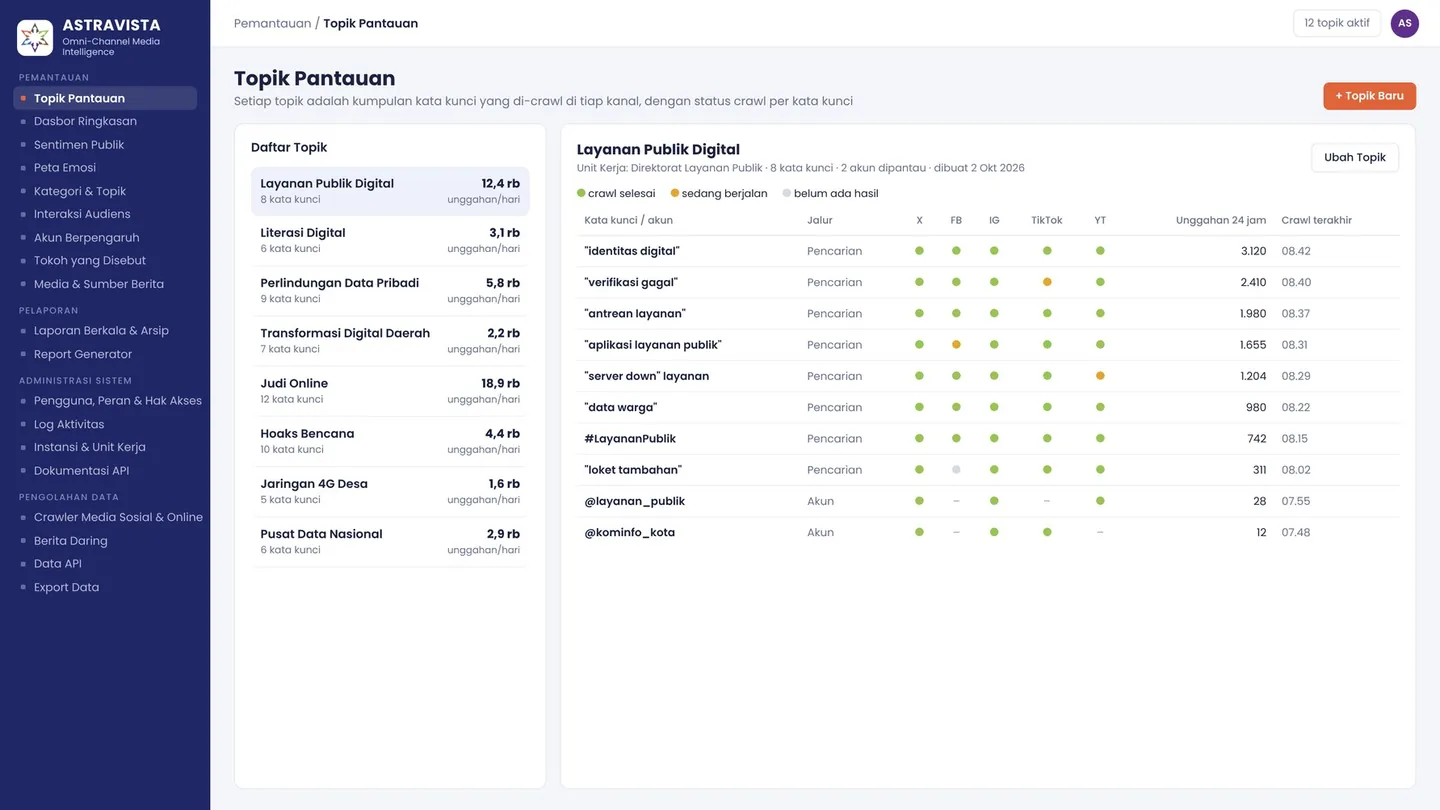
A Monitored Topic is the set of keywords for one issue. Each keyword is crawled on every social network, and its crawl status is visible at a glance.
- Keywords per topic across five social networks
- Crawl status for each keyword, per channel
- Incoming mentions and time of the last crawl
- Specific accounts can be monitored alongside keywords
Monitored TopicsIllustrative data 02Feature 2 of 9
Summary Dashboard
The whole conversation at a glance
The Summary Dashboard sums up a monitored topic: volume, unique accounts and engagement, compared with the previous period.
- Volume, unique accounts, engagement and potential reach
- Daily volume trend with the peak day marked
- Mentions by channel
- Sentiment mix and Net Sentiment Score
Summary DashboardIllustrative data 03Feature 3 of 9
Public Sentiment
Measuring the direction of opinion
Every mention is classified as positive, neutral or negative. The daily Net Sentiment Score gives a single indicator of where opinion is heading.
- Sentiment mix per channel
- Daily Net Sentiment Score
- Top terms per sentiment
- Negative mentions with the most engagement
Public SentimentIllustrative data Daily Net Sentiment Score
Sentiment Mix by Channel
- Positive
- Neutral
- Negative
04Feature 4 of 9
Emotion Map
Eight basic emotions, per channel and per day
The Emotion Map reads the dominant emotion of each mention using Plutchik's eight basic emotions: anticipation, anger, joy, trust, sadness, fear, disgust and surprise.
- Mix of the eight emotions per channel
- Daily emotion trend
- Comparison with the previous period
- Emotion distribution across the topic
Emotion MapIllustrative data Emotion Wheel
- This period
- Previous period
Emotion Distribution
- Anger27%
- Sadness14%
- Anticipation13%
- Fear12%
- Disgust10%
- Surprise9%
- Joy8%
- Trust7%
Summary: The share of anger rose from 14% to 27% compared with the previous period; trust fell from 16% to 7%.
05Feature 5 of 9
Categories & Subtopics
Breaking a big issue into subtopics
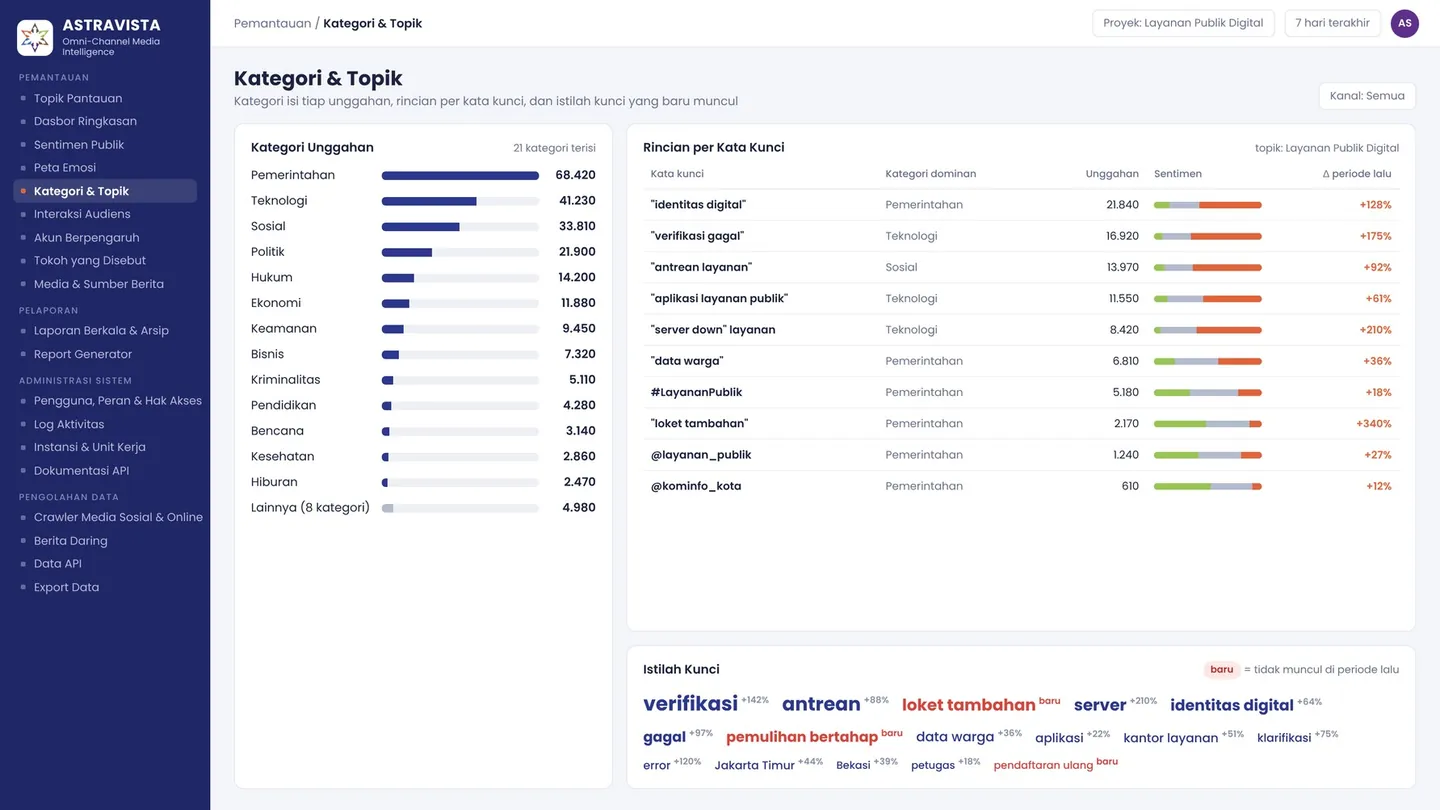
Every mention is given a content category. A breakdown per keyword and newly emerging key terms reveal the subtopics that are gaining ground.
- Content categories such as politics, government and disasters
- Dominant category, volume and sentiment per keyword
- Top key terms with the change from the previous period
- Flags for new terms not seen before
Categories & SubtopicsIllustrative data 06Feature 6 of 9
Audience Engagement
How the audience responds
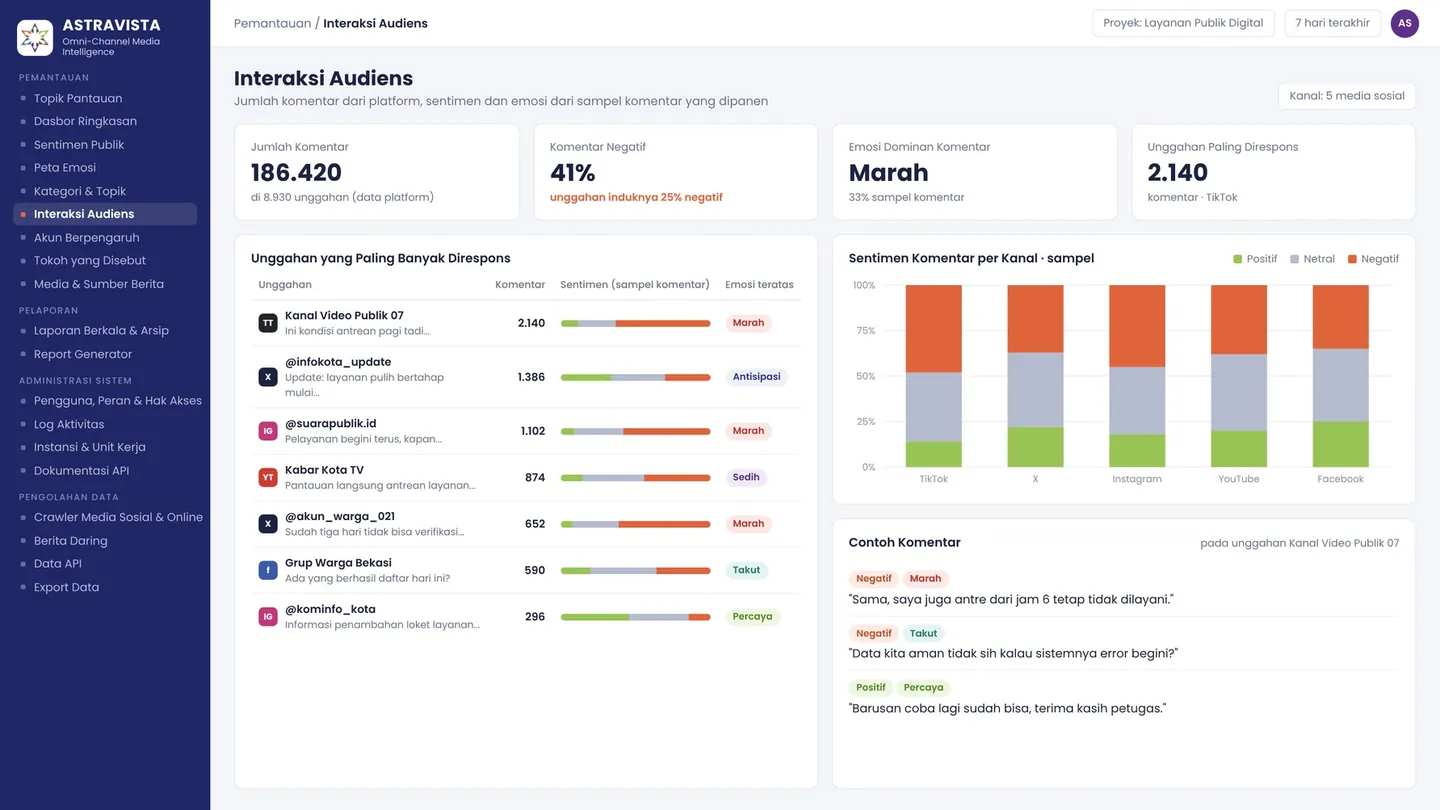
Audience Engagement reads the comments under each post: which posts draw the most response, and what sentiment and emotion the commenters express.
- Comment counts per post from platform data
- Sentiment and emotion from a sample of comments
- Comparison with the sentiment of the parent post
- Posts that draw the most response
Audience EngagementIllustrative data 07Feature 7 of 9
Influential Accounts
Who shapes the conversation
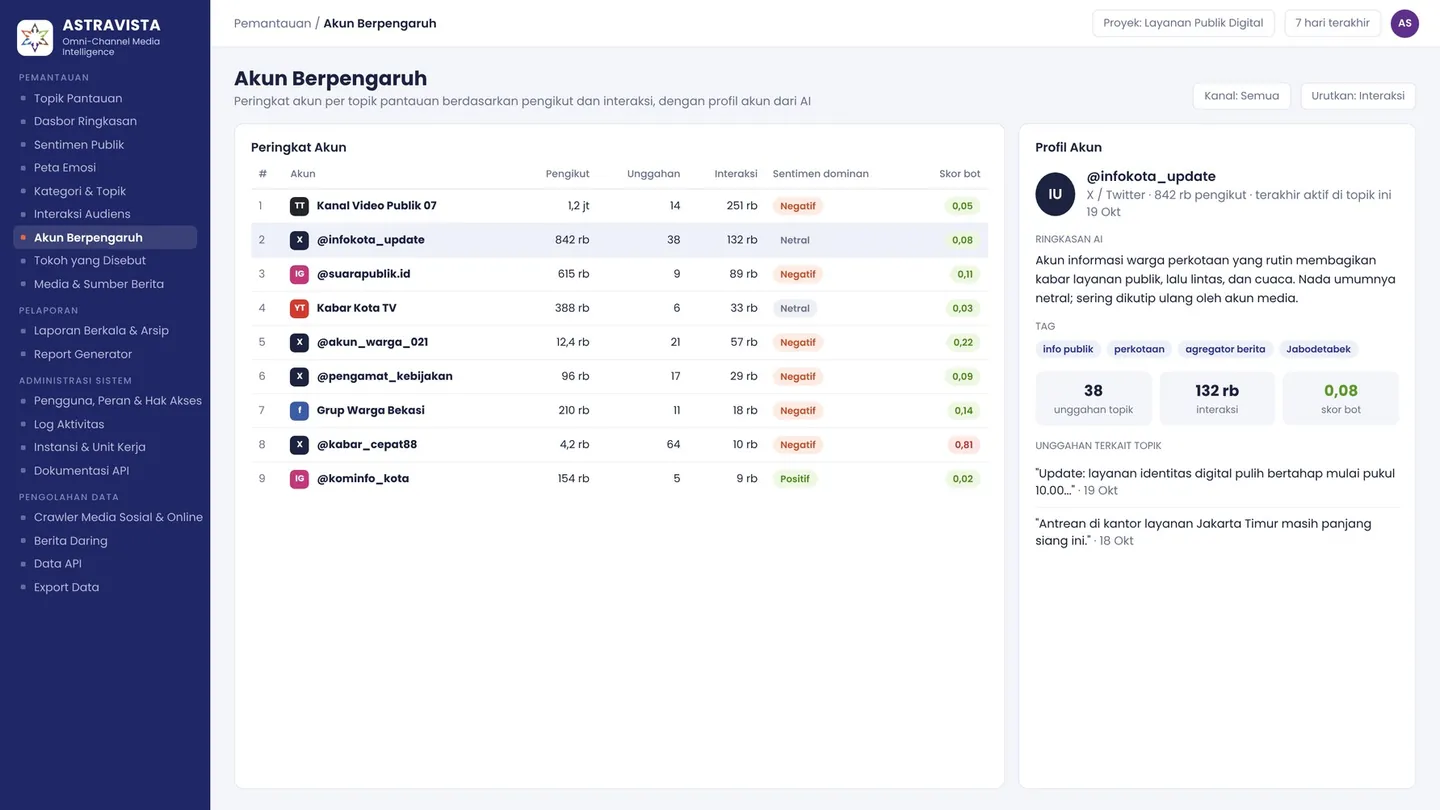
Influential Accounts ranks accounts per monitored topic by followers and engagement, with an AI-written summary of each profile.
- Account ranking by followers and engagement
- AI summary of each account profile
- Account tags and bot score
- The account's posts related to the topic
Influential AccountsIllustrative data 08Feature 8 of 9
Mentioned Figures
People, organisations and places in the conversation
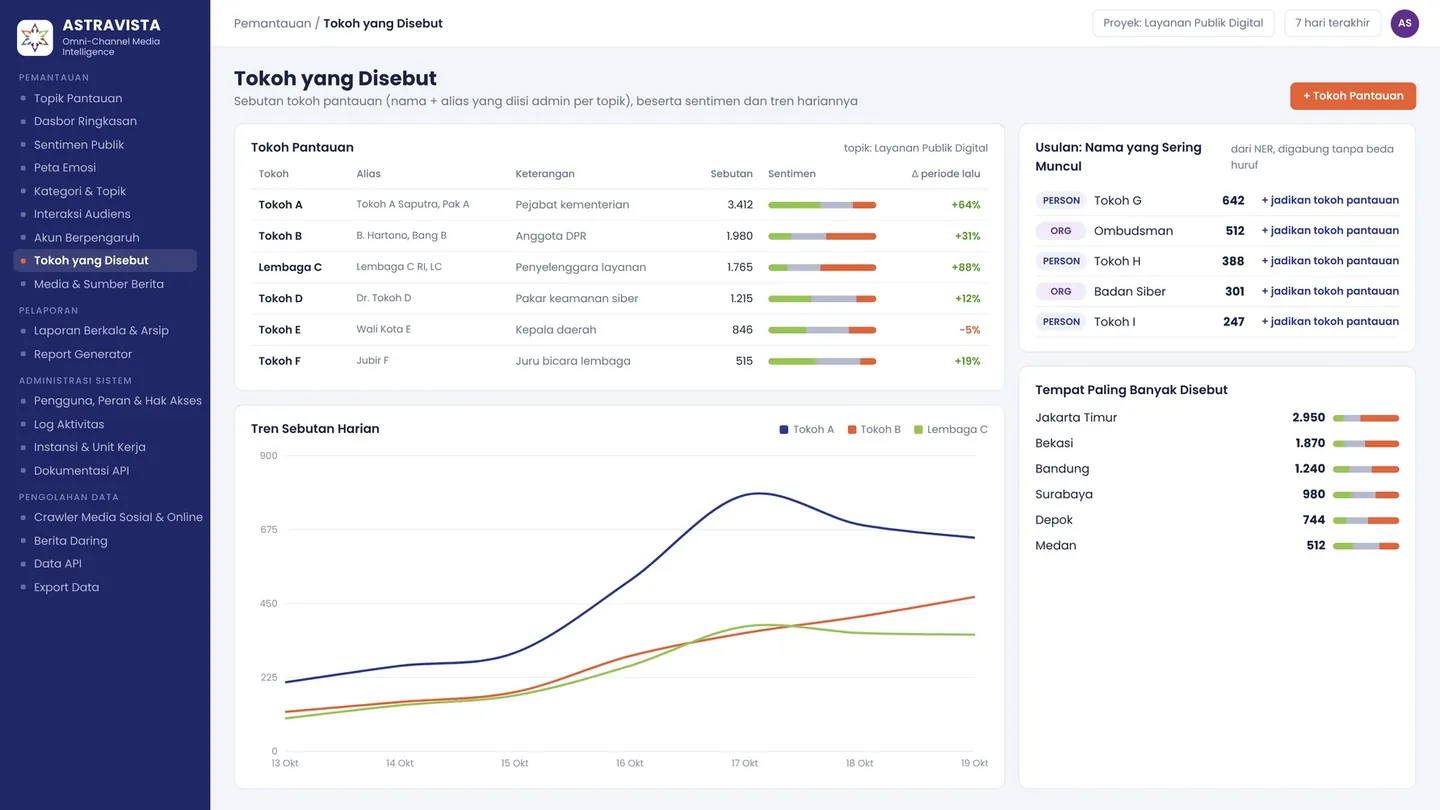
Administrators register the figures to watch for each topic, people or organisations together with their aliases. Mentions, sentiment and daily trends are calculated automatically.
- Watched figures: name, aliases and description
- Mentions, sentiment and daily trend per figure
- Suggested names that come up often in the conversation
- Most frequently mentioned places
Mentioned FiguresIllustrative data 09Feature 9 of 9
Media & News Sources
A map of online news coverage
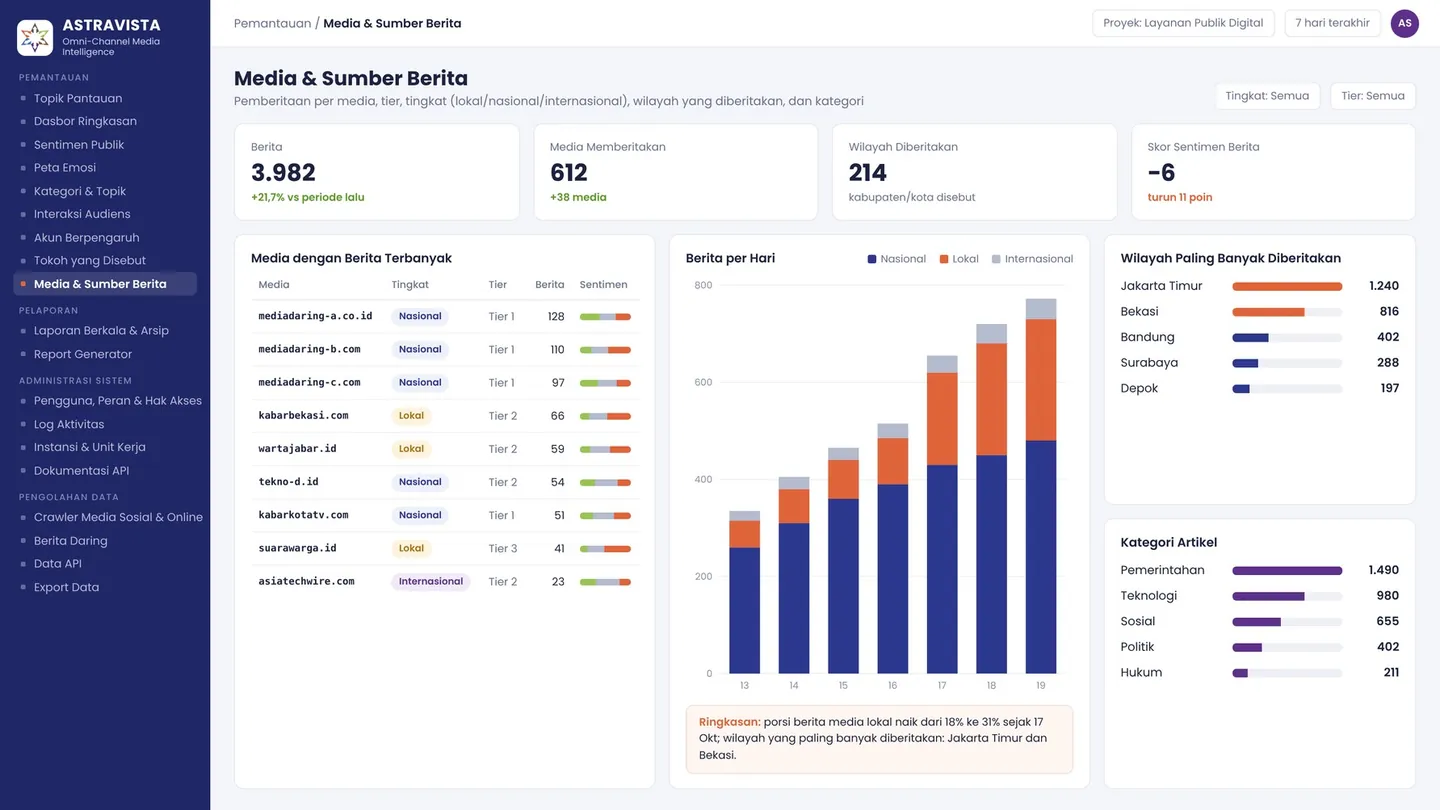
Media & News Sources maps coverage by outlet, with its tier, level (local, national, international), the regions covered and the category.
- Articles per outlet and outlet tier
- Split between local, national and international coverage
- Regions that receive the most coverage
- Category and sentiment of the coverage
Media & News SourcesIllustrative data
01 / 09Monitored Topics
Illustrative data04By the numbers
Product scope you can measure
These figures describe what ASTRAVISTA covers as a product, from the channels it monitors to the implementation phases.
- channelsFive social networks and one online media channel
- 6
- featuresIn four module groups
- 19
- basic emotionsBased on Plutchik's model of emotions
- 8
- sentiment classesPositive, neutral and negative
- 3
- access levelsNo access, view, edit, manage
- 4
- report formatsPDF, Word and PowerPoint
- 3
- technical supportRemote, including bug fixes and maintenance
- 24/7
- implementation phasesFrom kick-off to ongoing operation
- 5
05Reporting
Reports ready to send in minutes
Choose the topic, period, channels and report sections. The Report Generator assembles the charts, tables and summary sentences from the numbers automatically.
Report Generator
- Report sections: dashboard, sentiment, emotions, audience, accounts, figures and media
- Charts and tables straight from the data
- Summary sentences from number-driven templates
- Download as PDF, Word or PowerPoint
Scheduled Reports & Archive
Daily and weekly reports are produced automatically by the Report Generator from fixed templates, then kept in an archive that is easy to search.
- Automatic daily and weekly reports
- Fixed templates per monitored topic
- Report archive by topic and period
Report sections
- Summary Dashboard
- Public Sentiment
- Emotion Map
- Audience Engagement
- Influential Accounts
- Mentioned Figures
- Media & News Sources
 ASTRAVISTAIllustrative data
Monitored Topic Report: Digital Public Services
Period 13–19 Oct 2026 · all channels
1. Summary Dashboard
Mention volume rose 12.4% on the previous period, peaking at 52,500 mentions on 19 Oct.
2. Public Sentiment
The negative share rose from 19% to 25%; the Net Sentiment Score fell from +20 to +9.
06Hybrid architecture
A clear line between the subscribed service and what stays with your agency
Data collection and AI enrichment run as a subscribed service. The application and storage are installed on-premise in your agency's data centre.
Data sources
Social media
X, Facebook, Instagram, TikTok, YouTube
Online media
Local, national and international news portals
Subscribed service
Acquisition
Social media crawler
Collection by keyword, account and post URL
Online news crawler
Article collection from a list of media sources
Subscribed data service
Synchronisation for up to 100 active topics
Processing & AI
News processor
Extraction, deduplication and enrichment
Social media processor
Normalisation, spam and bot filtering, AI enrichment
AI service
Per-mention enrichment: sentiment, emotion, category, topic, entities
On-premise at the agency
Storage
Data lake
Distributed storage with near real-time indexing
Analytics engine
Aggregation and pre-computed metrics
Database
Master-slave, backup and recovery
Application
ASTRAVISTA web dashboard
Monitoring and reporting
Data API & Data Export
Access for external systems and data downloads
Access control
Roles, permissions and activity log
- On-premise
- Application and storage
- Subscribed
- Crawling and AI enrichment
- Data at the agency
- Monitoring results and reports
- Router/firewall
- A single internet gateway
07Data processing & integration
Data and AI results ready for your agency's other systems
Data is not locked inside the dashboard. Your technical team can pull mentions together with their AI results through the Data API, or download them for their own analysis.
Social & Online Media Crawler
Five social networks and one online media channel, through search, account, post and comment paths. The status of each path is visible: running, degraded or down.
Online News
Collected per media source rather than per keyword, with tier, level and province of origin for local outlets.
Data API
Search mentions and accounts, and request crawls by keyword, account or post. One API key per application, with the time it was last used.
Data Export
Every mention in a topic with its sentiment, emotion, category, figures and location, via the Data API (JSON) or as CSV and Excel downloads.
Crawler status
Illustrative data- XRunning
- FacebookRunning
- InstagramRunning
- TikTokRunning
- YouTubeRunning
- Online mediaRunning
Paths: search · accounts · posts · comments
Example Data API request
Illustrative exampleRequest
POST /data/v1/mentions
Authorization: Bearer ••••••••

{
  "q": "antrean layanan",
  "channels": ["x", "tiktok"],
  "from": "2026-10-13",
  "sentiment": "negative",
  "limit": 50
}
Response · 200 OK
{
  "total": 1940,
  "nextCursor": "c2VxOjE5NDA…",
  "items": [
    {
      "id": "x:1849…",
      "channel": "x",
      "publishedAt": "2026-10-19T08:42:11+07:00",
      "content": "Example post text about service queues…",
      "sentiment": "negative",
      "emotion": "anger",
      "categories": ["Government"],
      "locations": ["East Jakarta"]
    }
  ]
}
Illustrative example. Every endpoint is documented in the API Documentation inside the application.
08Governance & security
The right access, and every action on record
Administrators decide who can see and change what. Every action in the system leaves a trail for audit purposes.
Users, Roles & Permissions
Each role has per-module permissions at four levels. A user's access can be revoked in a single step.
Activity Log
Records who did what and when, from sign-in to configuration changes, together with the IP address.
Institution & Work Units
Users and monitored topics are grouped by institution and work unit, with topic and channel quotas and the modules that are enabled.
API Documentation
Every Data API endpoint is explained inside the application: parameters, example requests, example responses and API key authentication.
Permissions per module
Illustrative example| Role | Monitoring | Reporting | Administration | Data Processing |
|---|---|---|---|---|
| Administrator | Manage | Manage | Manage | Manage |
| Analyst | Edit | Edit | No access | View |
| Executive | View | View | No access | No access |
| Viewer | View | No access | No access | No access |
Activity log
Illustrative example| Time | User | Action | IP address |
|---|---|---|---|
| 09:12 | Analyst 1 | Exported topic data (JSON) | 10.20.6.33 |
| 09:08 | Analyst 1 | Opened the Report Generator | 10.20.6.33 |
| 09:02 | Administrator | Added a topic keyword | 10.20.5.12 |
| 08:57 | Executive | Signed in | 10.20.4.7 |
09Support services
Support from installation through daily operation
Alongside the software, ASTRAVISTA comes with four support services.
On-Premise Installation
ASTRAVISTA installed on your agency's infrastructure, under a white label.
Training & Analysts
Three days of user training and weekly analysis reports throughout the support period.
24/7 Technical Support
Remote support around the clock, bug fixes, monthly reports and system maintenance.
Data for 100 Topics
A subscribed data service for social and online media covering up to 100 active topics.
10Implementation phases
Five phases, from kick-off to ongoing operation
Once servers and network are ready, software installation takes one to two weeks. Phase two is carried out by the agency or its partner.
- 1
Project Initiation
- Purchase order
- Kick-off meeting
- 2By the agency/partner
Server and Network Preparation
- Server and network preparation
- Server and network installation and configuration
- 3
Implementation
- ASTRAVISTA software installation (1–2 weeks)
- User training (3 days)
- Functional testing
- 4
Product and Service Handover
- 5
Maintenance, Technical Support and Analyst Support
11FAQ
Frequently asked questions
Can't find your answer? Get in touch for a demo session and a technical discussion.
What is installed on the agency's servers?
The application and storage: the ASTRAVISTA web dashboard, the Data API and Data Export, access control, plus the data lake, analytics engine and database. The servers and network are prepared by the agency or its partner in phase two of the implementation, before the software is installed.
What does the subscribed service include?
Data collection from five social networks and online media, together with per-mention AI enrichment: sentiment, emotion, category, topic and entities. The data service covers up to 100 active topics, and the results are synchronised to on-premise storage at the agency.
Can ASTRAVISTA carry our agency's identity?
Yes. ASTRAVISTA is installed as a white-label product, so the application name, logo and colours follow your agency's identity.
Where are the monitoring results stored?
Monitoring results and reports are kept in on-premise storage in your agency's data centre. The connection to the internet passes through a single gateway, the router/firewall.
Can the data be used by our other systems?
Yes. The Data API (JSON) provides mention and account search as well as crawl requests, with one API key per application. Every mention in a topic, with its AI results, can also be downloaded as CSV or Excel.
How long does implementation take?
Once servers and network are ready, software installation takes one to two weeks, followed by three days of user training and functional testing. After handover, ASTRAVISTA is backed by maintenance, 24/7 technical support and analyst support.
How is user access controlled?
Administrators manage users and roles. Each role has per-module permissions at four levels: no access, view, edit or manage. Every action is recorded in the Activity Log with the time, user, target and IP address.
12Contact
Schedule an ASTRAVISTA demo
In a demo session, our team walks you through monitoring, reporting and data integration, and answers your technical and procurement questions.
To schedule a demo, give us a call.
- Company
- PT Astrabuana Sendhang Pranawa
- Address
- 18 Office Park, Lantai 22 Suite E, F, GJl. TB Simatupang Kav. 18, Jakarta Selatan 12520
- Phone
- 021 80641965